
From the 1st November 2026, the below requirements will need to be included in the products information,
Any order that is going from the UK to the EU and doesn't have the required information will fail to book
This means that shipments from outside the EU to EU countries with a value of €150 or less will require full customs clearance.
TABLE OF CONTENTS
Which shipments are affected?
The new requirements apply to shipments that meet all of the following criteria:
- The shipment is sent from outside the EU to an EU country.
- It is a B2C (business-to-consumer) distance sale.
- The shipment has a declared value of €150 or less.
- The seller directly or indirectly arranges delivery to the EU customer.
Not affected: B2C return shipments from outside the EU into the EU.
Shipments can be marked as B2C or B2B in the carrier settings.
Product identifiers
For affected shipments, you must provide product identifiers for each product/line item on the commercial invoice.
You need to provide the following:
1. Merchant Product ID
Your SKU or product/listing code. We already have this.
An example would be: 12345-BLK-M
2. Manufacturer Product ID – Required
The manufacturer's model, part, or style number, this can be found in the supplier records, product documentation, or packaging.
An example would be: ZX2291BK42 (factory model/variant reference)
3. Standardised Product ID – Required if available - If not, "no" is required.
A recognized standard product identifier, where one is available.
Examples include:
- GTIN
- EAN
- UPC
- ISBN
If no standardised product identifier is available, enter “no”.
You can learn more about this information here: https://passportglobal.com/blog/eu-product-identifiers-pid-guide-2026/
Where can I add these details?
| EU requirement | Enter it in this Shiptheory field | CSV column | Example |
|---|---|---|---|
| Merchant Product ID | SKU (already held) | sku | 12345-BLK-M |
| Manufacturer Product ID | MID Code | export_details.mid_code | ZX2291BK42 |
| Standardised Product ID | GTIN | export_details.gtin | 5012345678900, or no |
Note - The MID Code field holds the manufacturer’s own product code for EU shipments, not a US MID built from the manufacturer’s name and address.
Product By Product
These fields can be found in the Product Catalogue under Export Details.
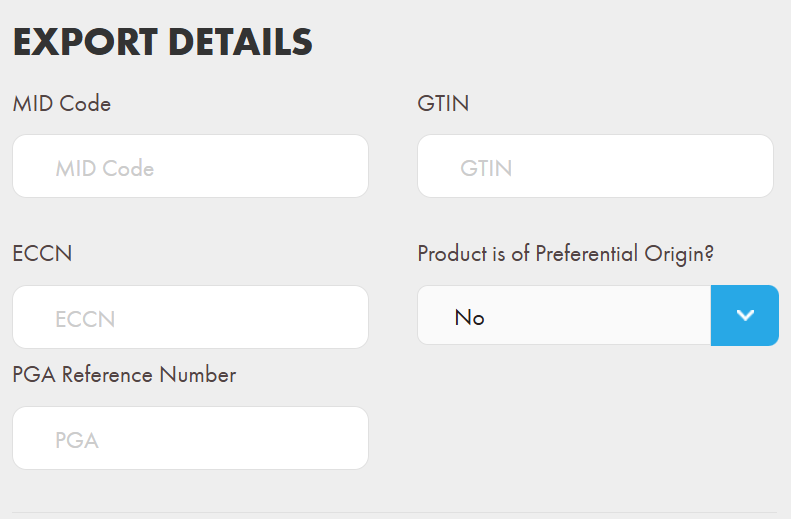
You can add the information to each product individually.
Bulk upload
If you need to update a large number of products, you can also bulk upload this information using a CSV file instead of entering it individually.
For instructions on how to upload product information using a CSV file, see our Product CSV Upload Guide.
You can get an export of your products from Shiptheory here: https://helm.shiptheory.com/products/export
When uploading via the link above, we only need the SKU (to match up the product), the Non-standardised Manufacturer Product Identifier (in the MID code column), and the Standardised Manufacturer Product Identifier (in the GTIN column).
From your Sales Channel
We're currently working with our integrators to automate this process, but for now this will need to be done in Shiptheory. Please contact support for the latest update on the integration you use.
If you encounter any issues, please feel free to contact our support team. You can call us on 0117 403 4313 (UK) / +1 (629) 666-6726 (US) or reach us online here.